Search engine optimization can feel overwhelming when you’re running a small business. Between creating content, updating your website, and marketing your services, learning SEO tools might seem like just another thing on your to-do list.
But the right tools can make SEO much easier.
Instead of guessing what people are searching for, SEO tools help you find keywords, understand your competitors, and track how your content performs in search results.
Over the years, I’ve tested a variety of SEO tools for my own website and for client projects. Some were incredibly helpful, while others were more complicated than necessary for a small business.
In this guide, I’m sharing the best SEO tools for small business owners in 2026, including the tools I’ve personally tested and the ones I currently use in my business today.
Whether you’re looking for a keyword research tool, competitor analysis insights, or better ways to monitor your website performance, these tools can help simplify your SEO strategy.
AFFILIATE DISCLAIMER: I SOMETIMES LINK TO PRODUCTS AND SERVICES TO HELP COVER THE COSTS OF RUNNING THIS BLOG. THERE’S NO EXTRA COST TO YOU – AND I ONLY RECOMMEND PRODUCTS THAT I’VE BOTH USED PERSONALLY AND THINK ARE QUALITY PRODUCTS THAT HELP WITH EFFICIENCY. PLEASE READ MY AFFILIATE DISCLOSURE FOR MORE INFORMATION. THANKS FOR YOUR SUPPORT!
Table of Contents
Why SEO Matters for Small Businesses
Search engine optimization is one of the most sustainable ways for small businesses to attract website traffic.
Unlike paid ads, which stop generating traffic when your budget runs out, SEO can continue bringing visitors to your site long after content is published.
When your website ranks for relevant keywords, potential customers can find your business while actively searching for solutions.
Benefits of SEO for small businesses include:
- Consistent long-term website traffic
- Increased brand visibility in search engines
- Greater trust with potential customers
- More opportunities to generate leads or sales
Even publishing one well-optimized blog post each month can start building search visibility over time.
If you’re new to tracking how your website performs in search results, a good starting point is learning how to use Google Search Console. Google’s own documentation explains how the platform helps monitor search performance and identify keyword opportunities.
Related Article: Ultimate SEO Guide
Share it on Pinterest!
What Makes a Good SEO Tool for Small Business Needs
Not every SEO tool is designed for small business owners.
Some platforms are built for large marketing teams and come with a steep learning curve or expensive monthly subscriptions.
When choosing the best SEO tools for small business needs, I look for tools that provide:
Easy Keyword Research
A good keyword research tool helps you discover what people are already searching for so you can create content that matches those searches.
Competitor Analysis
Understanding what your competitors rank for can reveal new content opportunities.
Clear SEO Data
Small business owners don’t need complicated dashboards. The best tools provide simple insights like:
- search volume
- keyword difficulty
- ranking opportunities
Affordable Pricing
Small businesses often need tools that provide strong functionality without enterprise-level pricing. Find what works for your budget. I’ve used both expensive tools for clients and more budget-friendly tools for one person businesses. All of them work. Find what fits your budget and gives you what you the things you absolutely need.
Practical Insights
The most useful SEO tools help you decide what to create next, not just show data. You need to know what’s working, what isn’t, and where to go next. Google Search Console and Google Analytics are both free and give you a great start on what’s working and what isn’t. They even give you ideas for where to go next. If you don’t have a budget, start there. More on both of these options below.
SEO is one of the best ways to generate organic traffic. If you’re comparing long-term strategies, here’s the difference between organic vs paid content.
The Best SEO Tools I’ve Personally Tested
Over the years, I’ve experimented with several SEO tools while managing my own website and helping clients improve their content strategy.
Some tools worked better than others depending on budget, experience level, and business needs.
Below are the SEO tools I’ve tested and how they can help small business owners improve their search engine optimization.
1. Google Search Console
Google Search Console is one of the most valuable free SEO tools for small business owners.
This tool shows exactly how your website performs in Google search results.
You can use it to:
- track which keywords your site ranks for
- identify pages receiving search traffic
- monitor indexing issues
- discover new keyword opportunities
For many small business websites, this tool provides more valuable insights than some paid platforms.
It’s also one of the tools I currently use regularly in my business to monitor blog performance.
2. Google Analytics
Another essential tool is Google Analytics.
While Google Search Console shows how your website performs in search results, Google Analytics shows what visitors do after they arrive on your website.
It helps you understand:
- which pages attract the most visitors
- how long people stay on your site
- where your traffic comes from
- which content performs best
Learning how website analytics work can help guide your content strategy. If you’re new to it, Google provides a helpful overview of how Google Analytics tracks website traffic and user behavior.
3. Keysearch
Keysearch is currently one of the primary keyword research tools I use in my business.
It’s especially helpful for small business owners and bloggers because the interface is simple and the pricing is more affordable than many enterprise-level SEO platforms. It also has all the necessary SEO tools, without all the extras that can be overwhelming to someone that is a beginner or intermediate level of SEO knowledge.
With Keysearch you can:
- discover long-tail keyword ideas
- evaluate keyword difficulty
- analyze competitor rankings
- track search rankings over time
- get semantic keyword suggestions
- find optimized title and heading options
For bloggers and small businesses focusing on content marketing, Keysearch provides many of the core features needed for effective keyword research. It’s what I personally use in my business. And I love how easy it is to use when I help clients setup their own Keysearch accounts.
Plus, the budget is just right if you’re a team of just one or two in your business, or even if you’re just starting out.
4. Ubersuggest
Ubersuggest is another platform I’ve used for both my website and client projects.
Originally created by digital marketer Neil Patel, Ubersuggest is designed to make SEO data more accessible for beginners.
This tool can help with:
- keyword research
- competitor analysis
- content ideas
- backlink insights
It’s a good option for small businesses that want SEO insights without using more complex platforms.
I still occasionally use it alongside my other tools. I purchased a lifetime deal, so I don’t have to pay monthly. That means I can login and use it for keyword research whenever I want. I can also have it run a site audit and fix anything that comes up.
If the lifetime deal is available, it’s a nice option so you don’t have a monthly or yearly payment going forward. The only thing that I would point out as a negative, is there are some things not included in the lifetime deal.
That means you’ll have some tools that you won’t have access to. You’ll have to pay to add them on. And so far, I find the add-ons to be pricey. Had I known the specific tools that weren’t going to be included in the future, this wouldn’t have been my first pick. So keep that in mind when you’re deciding.
5. RankMath SEO
For WordPress websites, RankMath SEO is a great option. It’s one of the plugins I currently use.
This tool helps optimize content directly inside the WordPress editor. It’s specifially for blogs. I use my blog for more traffic to my website, email list, paid services, and digital products.
RankMath provides features like:
- on-page SEO analysis
- schema markup options
- internal linking suggestions
- meta title and description optimization
- blog post scoring for better optimization
- analytics right inside the WordPress dashboard
- tracking keywords
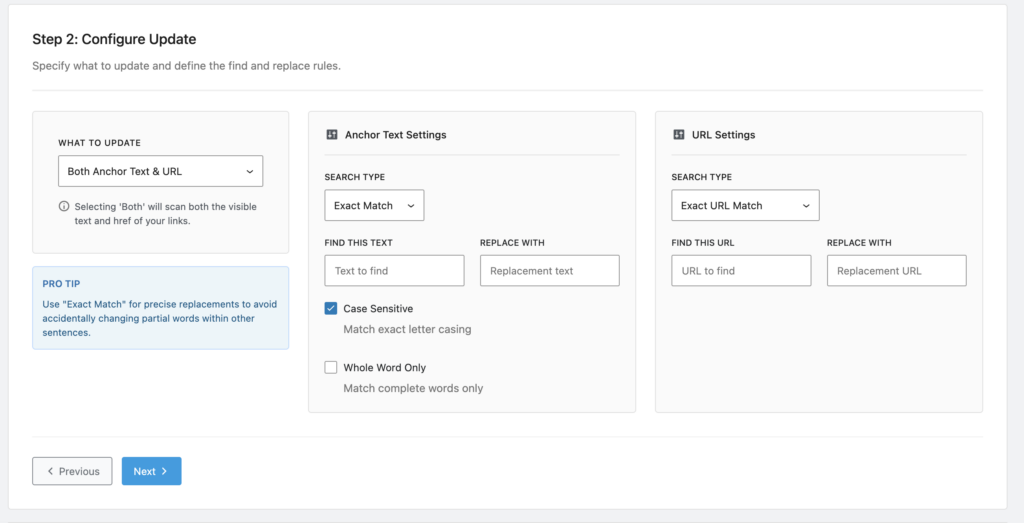
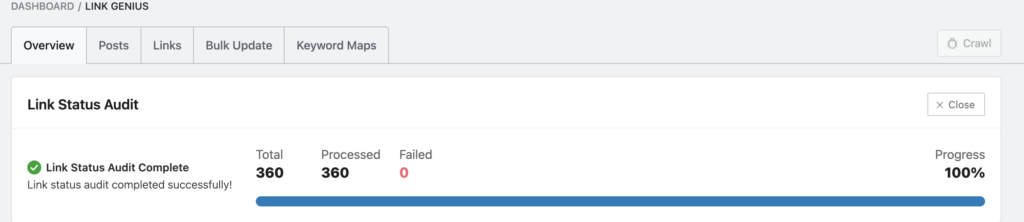
For bloggers who want SEO guidance while writing content, plugins like RankMath can be very helpful. They also offer AI Content, which helps to give you ideas for internal links and recent article links. Both of which help with your overall SEO strategy. And Link Genius is a new tool recently added. It’s a huge help when bulk editing. For example, I recently got a new link for my Tailwind App affiliate link. Instead of manually changing out each link on every single blog post that mentions it, I simply changed it in Link Genius. It was quick, easy, and took about 60 seconds.
Here’s a screenshot of How to Use Link Genius:
- Add your text to find.
- Then add your replace with text.
- Click next, and you’re done!
- Simple and easy.
And here’s what it looks like after your text has been update. So much easier, and WAY faster than updating manually across tons of blog posts.
6. Other SEO Tools I’ve Tested
In addition to the tools above, I’ve also tested several other SEO platforms while working on different projects.
These include:
These tools are powerful and widely used in the SEO industry.
For example, platforms like SEMrush provide extensive research data and competitor insights. If you’re curious about how their platform works, they provide detailed resources explaining how keyword research tools support SEO strategy.
While these tools are powerful, many small businesses find they only need a few core tools to manage their SEO effectively.
If you’re planning blog content around keywords, creating structured content categories can help. Here’s how to use content buckets vs content pillars in your strategy.
Related Article: How to Find Blog Keywords That Drive Traffic (Step-by-Step Guide)
Free SEO Tools for Small Business Owners
If you’re working with a limited budget, there are still excellent free SEO tools available.
Some of the best free options include:
- Google Search Console
- Google Analytics
- Keyword Surfer
Free tools can help small business owners begin understanding search performance before investing in paid platforms.
Final Checklist: Best SEO Tools for Small Business Success
Before choosing an SEO tool, ask yourself a few practical questions.
- Does the tool help with keyword research?
- Can it identify competitor opportunities?
- Does it provide clear insights you can act on?
- Is the pricing reasonable for your business stage?
- Will it simplify your SEO workflow?
The best SEO tools are the ones that fit your budget, support your strategy, and make your work easier.
For my business, tools like Keysearch, RankMath, Google Analytics, and Google Search Console provide the right balance of features and affordability.
Once you start ranking for keywords, you can expand your reach by repurposing that content across platforms.
Pin it on Pinterest!

FAQ: Best SEO Tools for Small Business Owners
What is the best SEO tool for small businesses?
Many small businesses begin with free tools like Google Search Console and Google Analytics to monitor search performance and website traffic.
For keyword research and competitor insights, tools like Keysearch and Ubersuggest can provide helpful data.
Do small businesses really need SEO tools?
SEO tools make it much easier to understand how your website performs in search engines. Without tools, it becomes difficult to identify keyword opportunities, track rankings, or analyze competitor content.
Are free SEO tools enough for beginners?
Yes. Many small businesses start successfully using free tools. Platforms like Google Search Console provide valuable insights about keyword rankings and website performance without requiring a paid subscription.
How many SEO tools should a small business use?
Most small business bloggers only need three to five core tools, including:
– a keyword research tool
– a website analytics platform
– an SEO plugin for content optimization
Using too many tools can make your workflow more complicated than necessary.
Final Thoughts on The Best SEO Tools for Small Businesses in 2026
The best SEO tools for small business owners are the ones that help simplify search engine optimization and guide your content strategy.
Whether you’re researching keywords, analyzing competitors, or tracking your website performance, the right tools can make SEO more manageable.
Start with a few tools that fit your budget and needs, stay consistent with your content, and continue refining your SEO strategy as your business grows.
Related Articles:
All Content Strategy Blog Posts
5 Mom Entrepreneur Books: Level up your business
Content Buckets vs Content Pillars: What’s the Difference? (With Examples)
Content Creation Ideas
Ultimate SEO Guide: Drive More Website Traffic
Recent Articles:
- Content Repurposing with AI: Without Losing Your Voice
- Best Website Platforms for Small Business: Showit, WordPress, Squarespace, or Shopify?
- Rank Math SEO Review: Why I Chose This WordPress SEO Plugin for My Blog
- How Often Should You Update Your SEO Keywords?
- How to Grow Your Online Business the Right Way (So It Can Actually Provide for Your Future)
Related Posts




add a comment
+ show Comments