
Are Kit automations worth it? Well, if you read my post on Kit’s recent free plan changes, you already know that visual automations and sequences moved off the Free plan and now live under Creator and Pro. (Quick refresher if you’re new here: Kit is formerly ConvertKit — same platform, new name.) So the question I keep getting is simple: is Kit worth it once automations are behind a paywall?
Short answer: if you’re at the point where you have the budget for it, yes. Not “nice to have” yes — genuinely one of the more cost-effective email platform automations you can add to a small business. But that “if” matters, so let’s talk through what you’re actually paying for, what Kit’s pricing looks like right now, and who gets the most out of it.

AFFILIATE DISCLAIMER: I SOMETIMES LINK TO PRODUCTS AND SERVICES TO HELP COVER THE COSTS OF RUNNING THIS BLOG. THERE’S NO EXTRA COST TO YOU – AND I ONLY RECOMMEND PRODUCTS THAT I’VE BOTH USED PERSONALLY AND THINK ARE QUALITY PRODUCTS THAT HELP WITH EFFICIENCY. PLEASE READ MY AFFILIATE DISCLOSURE FOR MORE INFORMATION. THANKS FOR YOUR SUPPORT!
Table of Contents
What Kit’s Automations Actually Are
Before we get into whether they’re worth it, let’s lay out what you’re actually getting when you upgrade off the Free plan. Kit’s automation tools break down into a few categories:
- Visual Automation Builder — a drag-and-drop canvas where you build out email funnels based on subscriber behavior. Think: someone signs up → gets tagged → enters a sequence → clicks a link → gets moved to a different path. Kit’s visual automation builder lets you see the whole thing laid out on screen instead of guessing what happens next.
- Automation Template Library — pre-built automation funnels for common use cases (welcome sequences, freebie delivery, sales funnels) so you’re not starting from a blank canvas every time.
- Automated Email Sequences — a series of emails that go out automatically over time, like a welcome series or a “best of my content” series for new subscribers.
- RSS Campaigns — automatically sends an email whenever you publish new content on your blog, so your list gets notified without you doing anything manually.
- Content Snippets — reusable blocks of content you can drop into automations so you’re not rewriting the same paragraph for the fifth time.
- Creator Network Recommendations — a system where you can recommend other creators to your subscribers (and get paid for it), while other creators recommend you to theirs.
- 100+ App Integrations and API Access — for connecting other tools into your automations if you need something more custom.
That’s the full menu. Now let’s talk about what it costs to unlock it, and when that cost actually makes sense.
Kit Pricing for Automations (And When It’s Worth It)
Here’s Kit’s current pricing, pulled straight from their site:
- Free — $0/month, up to 10,000 subscribers, no automations
- Creator — starting at $33/month (billed yearly) for up to 1,000 subscribers, this is where automations unlock
- Pro — starting at $66/month (billed yearly) for up to 1,000 subscribers, adds advanced analytics and reporting on top of everything in Creator
A few things worth knowing before you upgrade:
- Pricing scales with your subscriber count. The number above is the starting tier — as your list grows past 1,000, the monthly cost goes up. So run your own numbers based on where your list actually is, not just the sticker price.
- New signups get a 14-day free trial of Creator, so you can test-drive automations before committing to anything.
- You don’t need Pro to get automations. Creator includes unlimited visual automations and sequences — Pro’s additions are mostly about analytics and reporting, which matter more once you’re already established.
So when does it make sense to pay? Here’s my honest read: if you don’t have a consistent way to bring in revenue yet — no product, no offer, no real reason someone needs to be on your list beyond “I like your content” — stay on the Free plan and focus on growing your list first. But the moment you have something to sell, even something small, or you’re spending real hours each week manually sending freebies and welcome emails, the math flips. Creator pays for itself fast when it’s replacing time you’d otherwise spend doing this by hand.
My Favorite Automations (And Why)
I don’t use every automation feature Kit offers, and you don’t need to either. Here’s what I actually rely on, and why.
The premade templates. I love these because they mean I’m not reinventing the wheel every single time I build something new. You can drag and drop a template and adjust it instead of starting from a blank canvas, which saves a genuinely significant amount of time. One thing I’d add: you can add as much or as little design to your automation emails as you want, and sometimes less design is actually better. A heavily designed email takes longer to load, and if someone’s opening it on a slow connection or an older phone, that delay costs you opens and clicks. Simple, fast-loading emails often outperform the fancy ones.
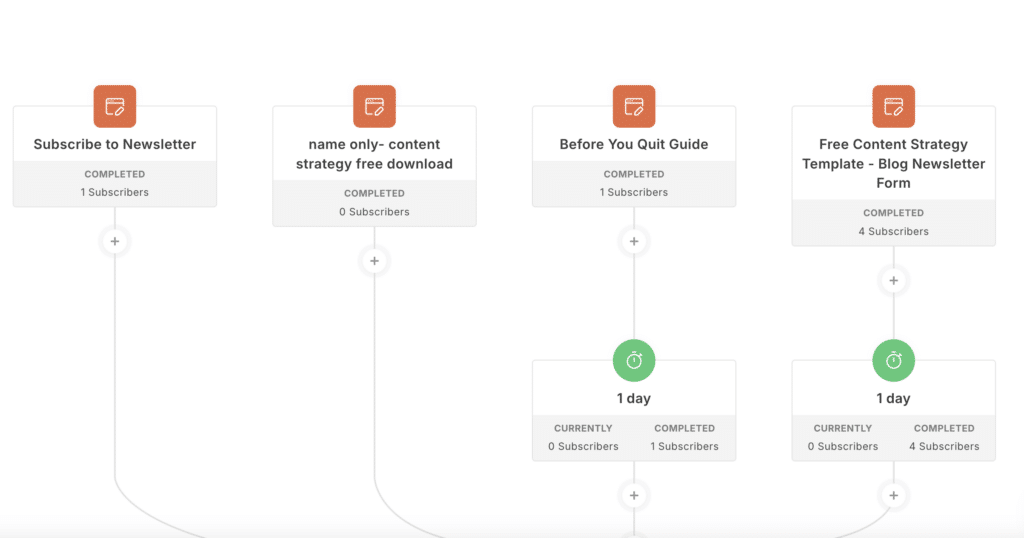
The Visual Automation Builder. This is the one I couldn’t run my business without. When you have a long automation with multiple entry points — say, someone can enter a sequence from three different opt-ins, or their path branches depending on what they click — being able to see the whole thing laid out visually is a game changer. I can look at the canvas and immediately understand what’s happening at every stage, instead of trying to hold it all in my head or dig through a list of rules.
Below is an example of one of my own visual automation builders with multiple entry points. The visual automations make it easy to drag and drop everything where I want it. It’s quick to setup, and you don’t need a marketing background to understand how it works to set it up.
Creator Network Recommendations. This one deserves more attention than it usually gets. Being part of the recommendation network means other creators can recommend your list to their subscribers, and you can do the same for them — and you get paid for it when you do. I’ve had a real number of subscribers join my list this way without ever visiting my website. That’s a genuinely different growth channel than SEO or social media, and it’s one that compounds: the more creators you’re connected with, the more consistently new people show up.
Which Automations Matter Most for You
Not everyone needs the same automations. Here’s how I’d prioritize depending on how you’re building your audience — pulling from the three creator types I outlined in my last Kit post.
If you’re growing through social media
Your biggest priority is capturing followers as subscribers and not losing them the second they leave the platform. Focus on:
- Welcome sequences — introduce new subscribers to your best content right away, since they likely just found you and don’t know your back catalog yet
- Automated freebie delivery — deliver your opt-in incentive instantly so there’s no lag between “I want this” and “I have this”
- Premade templates — since you’re likely building multiple lead magnets for different platforms, templates save you from rebuilding the same structure every time
If you’re a blogger or Pinterest creator
Your traffic is evergreen, which means your automations need to work at 2am just as well as they work at 2pm. Focus on:
- RSS Campaigns — turn new blog posts into emails automatically, so you’re not manually drafting a “new post” email every time
- The Visual Automation Builder — especially valuable here because evergreen traffic often means multiple entry points into your list (different content upgrades on different posts), and you need to see how they all connect
- Creator Network Recommendations — a genuinely strong fit for bloggers, since it’s another traffic source that doesn’t rely on Google or Pinterest algorithms
If you’re selling digital products
This is where automations earn their keep the most directly, because they’re doing the selling for you. Focus on:
- Sales and launch sequences — automate the entire path from opt-in to purchase, so a launch doesn’t require you to be at your computer sending emails in real time
- Purchase-based automations — move buyers out of your sales funnel and into a customer sequence automatically, so no one gets a sales email for something they already bought
- The Visual Automation Builder — non-negotiable here, since product funnels tend to be the most complex automations you’ll build, with multiple decision points based on what someone buys or clicks
Kit vs Other Email Platforms: How the Automations Compare
If you’re weighing Kit against other options, here’s an honest, no-spin comparison of where it lands.
Kit vs Mailchimp: Mailchimp’s free plan is more limited by contact count, but it’s genuinely easier for a total beginner to poke around in. Where it falls short is automation depth — Mailchimp’s automations feel more like an afterthought bolted onto an all-in-one marketing platform, while Kit’s visual automation builder was built specifically around the creator/subscriber relationship from day one. If you just want to send the occasional newsletter and never automate anything, Mailchimp is fine. If automation is the point, Kit’s approach is more intuitive.
Kit vs ActiveCampaign: This is the more interesting comparison. ActiveCampaign genuinely has more automation power — deeper conditional branching, a built-in CRM, more complex multi-channel sequences. But that power comes with a steeper learning curve and a higher starting price with no free tier at all. For most small business owners selling digital products, coaching, or content, Kit’s automation builder covers what you actually need without the extra complexity (or cost) of a full CRM system you’ll never fully use.
Kit vs Flodesk: I’m an affiliate for both Kit and Flodesk, and I genuinely like Flodesk — so I want to be fair here. Flodesk used to be a flat $19/month for unlimited subscribers, but they’ve since moved to tiered pricing based on subscriber count, similar to most other platforms.
Where Flodesk still wins, hands down, is email design. Their templates are beautiful, and if design is your top priority, Flodesk is a great choice. But when I was choosing a platform, I wanted better automations and segmentation set up from the start — the ability to actually categorize subscribers in detail and build out behavior-based journeys. Flodesk’s automations and segmentation are fairly basic by comparison, and their template selection, while gorgeous, is also more limited (though they may have added more since I last checked). My honest take: if design is what matters most to you, Flodesk is a strong second option — you can check out Flodesk here for 25% off your first year. If automations and segmentation are what you need, Kit is the better fit.
The honest takeaway: Kit isn’t trying to be the most powerful automation platform on the market. It’s trying to be the most usable one for creators and small business owners who need automations to work, not to become a second job to manage.
Related Article: Kit vs Flodesk: Which Email Platform Should You Actually Choose?
Share it on Pinterest!
Related Article: Why I Recommend the Kit Free Plan (And What Just Changed)
The Bottom Line: Is Kit Worth It?
Kit’s automations aren’t a “nice to have” feature — they’re the piece that turns your email list into something that works even when you’re not actively working on it. But they do cost money, and the smart move is waiting until you have the budget and a real reason to use them, rather than upgrading just because it’s there.
If you haven’t started with Kit yet, you can build your list for free up to 10,000 subscribers, then use the 14-day Creator trial to test automations out before deciding whether to upgrade. If you want more detail on what’s included on the Free plan versus Creator, I broke it all down in my other post on Kit’s free plan changes.
If you’re ready to try it, here’s my Kit link — it’s the same platform I use every day, automations and all.
Done beats perfect. Start where you are, and upgrade when the numbers actually make sense for your business.
Great automations work best when you have consistent traffic coming in. My Blog Post Keyword Research Workbook helps you find keywords your blog can rank for — so your content keeps driving new subscribers into your sequences. Get it here.
Recent Posts
- Content Repurposing with AI: Without Losing Your Voice
- Best Website Platforms for Small Business: Showit, WordPress, Squarespace, or Shopify?
- Rank Math SEO Review: Why I Chose This WordPress SEO Plugin for My Blog
- How Often Should You Update Your SEO Keywords?
- How to Grow Your Online Business the Right Way (So It Can Actually Provide for Your Future)
Frequently Asked Questions About Kit’s Automations
Are Kit’s automations worth it?
For most small business owners who have a product, offer, or consistent reason to nurture their list, yes. Automations replace hours of manual work — freebie delivery, welcome sequences, sales follow-up — with something that runs on its own. If you don’t have a product or offer yet, it’s worth waiting until you do before upgrading.
How much does Kit’s Creator plan cost?
Creator starts at $33/month billed yearly (or $390/year) for up to 1,000 subscribers. Pricing increases as your subscriber count grows, so check Kit’s pricing page for your specific list size.
Do I need Kit Pro to get automations?
No. Kit’s Creator plan includes unlimited visual automations and email sequences. Pro adds advanced analytics, engagement scoring, and reporting on top of what’s in Creator — it doesn’t unlock additional automation features.
What is Kit’s Visual Automation Builder?
It’s a drag-and-drop canvas where you build email funnels based on subscriber behavior — things like tags, clicks, and purchases — with visual branching paths so you can see your entire automation laid out at a glance.
Can I try Kit’s automations before paying?
Yes. New Kit signups get a 14-day free trial of the Creator plan, which includes full access to visual automations and sequences before you’re asked to pay anything.
What’s the difference between an automation and a sequence in Kit?
A sequence is a set series of emails sent in order over time, like a welcome series. An automation is broader — it can include sequences, but also tags, conditional branches, and triggers based on subscriber behavior, built out visually in the automation builder.
Is Kit’s Creator Network worth joining?
If your goal is growing your list beyond your own website or social channels, yes. It lets other creators recommend you to their subscribers (and you can recommend them back), which is a genuinely different traffic source than SEO or social media — and you can earn money from recommending others too.
Is Flodesk a good alternative to Kit?
It depends on what you value most. Flodesk has more beautiful email templates and a simpler interface, making it a strong choice if design is your top priority. Kit has deeper automations and more detailed subscriber segmentation, which makes it the better fit if you want to build out behavior-based journeys and categorize your audience in detail from the start.

add a comment
+ show Comments